How to Host a Necesse Server – Step-by-Step Guide for Adventurers
If you’re ready to build, explore, and survive in your own Necesse world, hosting your own server is the perfect way to bring friends together. You can shape the world, customize gameplay settings, install mods, and create the co-op adventure you want.
This guide walks you through hosting your own Necesse server and explains why Citadel Servers is a strong partner for your setup.
Step 1: Pick a Reliable Hosting Provider
Necesse blends adventure, base-building, and combat—meaning stable performance and low latency are essential for smooth gameplay. When choosing a hosting provider, focus on:
Performance: Necesse worlds run best on servers with fast CPUs and NVMe or SSD storage.
Network Quality: A reliable provider ensures low ping for players joining across regions.
Ease of Management: Look for a user-friendly control panel that makes configuration simple.
Support Availability: 24/7 technical support ensures you always have help when you need it.
Citadel Servers offers all of this, providing optimized hardware, stability, and tools tailored for co-op survival games like Necesse.
Step 2: Order Your Hosting Plan
Once you’ve decided to host with Citadel Servers, getting started is simple:
1. Go to the Necesse hosting page.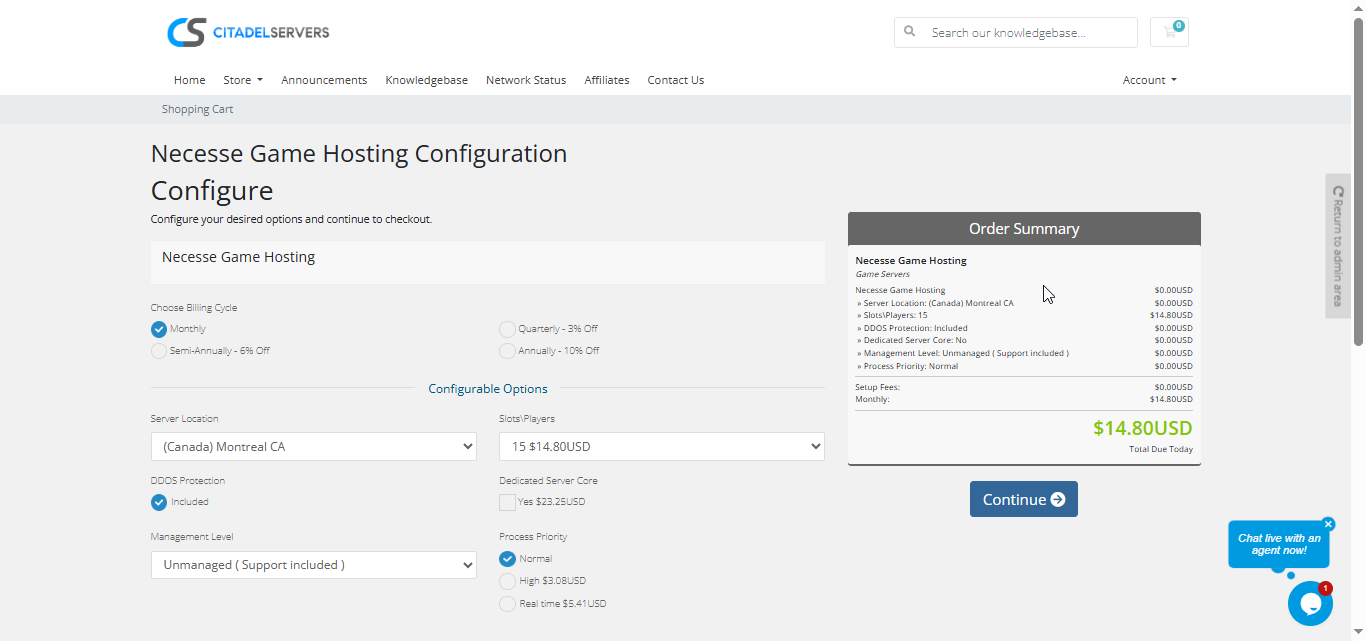
2. Choose how many player slots you want.
3. Pick your server location closest to your player base for the best ping.
4. Select any extras, like process priority, premium support, etc.
5. Proceed to checkout, once payment is confirmed, your server deploys automatically.
You’ll receive an email with your control panel login details and connection info within minutes.
Step 3: Configure Your Server
After deployment, it’s time to personalize your world:
- Follow our Quick Start Guide
Set your server name, password, and admin permissions.
Configure gameplay settings like difficulty, spawn behavior, world features, and PvP options.
Manage your world saves, import custom saves, or generate new ones.
Install mods easily through the Mod Manager, or upload them via FTP/SFTP.
Adjust server performance options to keep gameplay smooth even with many players building and exploring.
All configuration is handled through the Citadel Control Panel—simple, intuitive, and designed for new and experienced administrators.
Step 4: Launch and Play
When your settings are ready, start your server from the panel and invite your friends.
Players can connect via the in-game server browser or by entering the server’s IP and port.
You can monitor activity, manage users, and restart your world at any time, all through the same web interface.
Why Host with Citadel Servers
Hosting your Necesse server with Citadel Servers gives you the reliability, performance, and flexibility needed for uninterrupted co-op adventures. Our platform is built to keep your world stable whether you're farming, fighting, exploring islands, or taking on bosses.
What Makes Us Stand Out
Instant Setup: Your server deploys automatically right after payment, letting you start exploring immediately.
High-Performance Hardware: Fast CPUs and NVMe SSD storage deliver smooth gameplay and quick world loading.
Global Data Centers: Pick from multiple worldwide locations to ensure the best connection for your group.
Full Access & Complete Customization: Tweak every server file, upload mods, configure worlds, and tailor the game to your liking.
One-Click Mod Manager: Browse, install, and update mods instantly—no manual uploading required.
Automated Backups & Easy Restarts: Protect your world with automatic backups and restart your server with one click.
24/7 Expert Support: No matter your time zone, our team is always available to help you troubleshoot and stay online.
Citadel Servers delivers the performance, customization, and reliability your Necesse adventures deserve.