How to Host a Medal of Honor: Allied Assault & Spearhead Server – Step-by-Step Guide for Soldiers
If you're ready to take full control of your Medal of Honor: Allied Assault and Spearhead experience, hosting your own server is the best way to build the perfect WW2 battlefield. You can customize game modes, manage maps, adjust rules, and invite your squad to relive classic multiplayer action exactly how you want it.
This guide explains how to host your own server and why Citadel Servers is a strong partner for running stable, high-performance MOHAA and Spearhead servers.
Step 1: Pick a Reliable Hosting Provider
Even though MOHAA and Spearhead are classic games, a reliable server is important for smooth multiplayer performance—especially during intense firefights, large custom maps, or modded sessions.
When selecting your host, focus on:
Performance: Strong single-core CPU performance and fast NVMe storage ensure minimal lag and quick map loads.
Network Quality: Low latency is essential for accurate shooting, fluid movement, and competitive matches.
Ease of Management: A user-friendly control panel helps you manage configs, mods, map rotations, and updates effortlessly.
Support Availability: 24/7 expert support helps resolve issues quickly so your matches run smoothly.
Citadel Servers offers optimized hardware and fast networks ideal for Source-based and classic FPS titles like MOHAA and Spearhead.
Step 2: Order Your Hosting Plan
Once you’ve decided to host with Citadel Servers, getting started is simple:
1. Go to the Medal of Honor Allied Assault and Spearhead hosting page.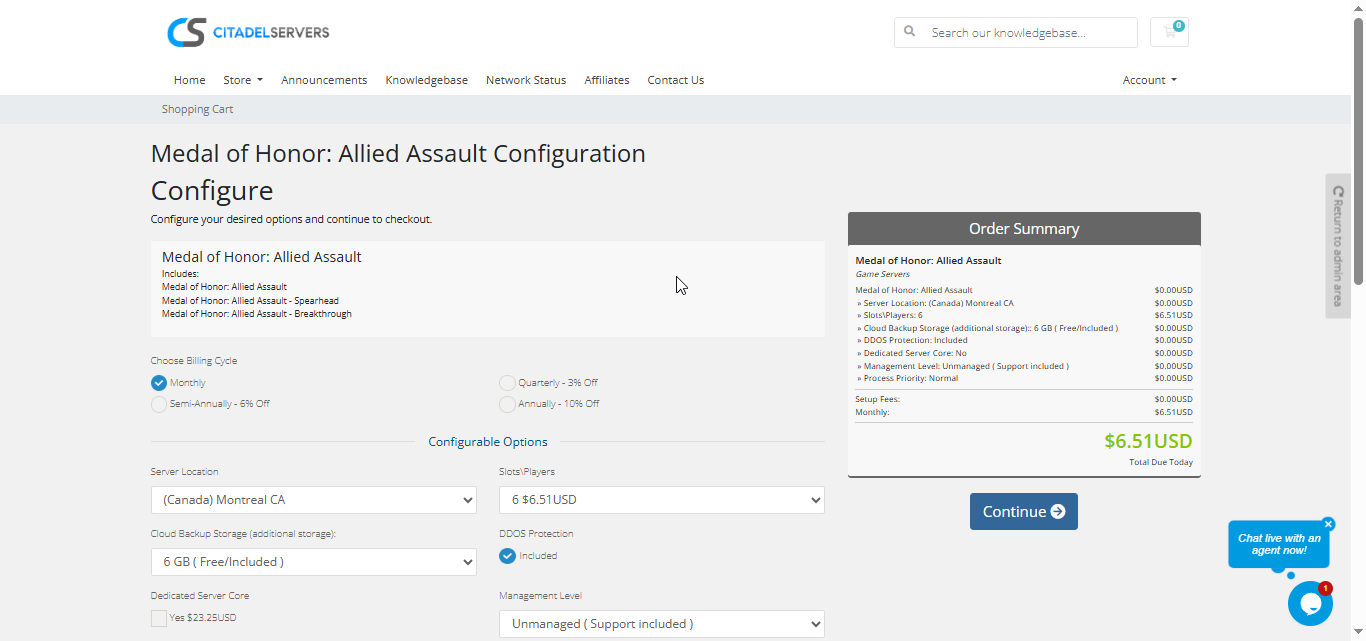
2. Choose how many player slots you want.
3. Pick your server location closest to your player base for the best ping.
4. Select any extras, like process priority, premium support, etc.
5. Proceed to checkout, once payment is confirmed, your server deploys automatically.
You’ll receive an email with your control panel login details and connection info within minutes.
Step 3: Configure Your Server
After deployment, you can begin customizing your battlefields:
- Follow our Quick Start Guide
Set your server name, password, and admin settings.
Configure game modes such as Deathmatch, Objective, Team Match, and more.
Customize weapon loadouts, friendly-fire rules, and gameplay variables.
Add custom maps and mods via File Manager or FTP/SFTP.
Edit config files such as server.cfg, map rotation lists, and Spearhead-specific settings.
Enable anti-cheat tools and server protections.
All configuration takes place inside the Citadel Control Panel, designed to be simple for beginners yet powerful enough for advanced server admins.
Step 4: Launch and Play
When your settings are ready, start your server from the panel and invite your friends.
Players can connect via the in-game server browser or by entering the server’s IP and port.
You can monitor activity, manage users, and restart your world at any time, all through the same web interface.
Why Host with Citadel Servers
Hosting Medal of Honor: Allied Assault & Spearhead with Citadel Servers ensures your WW2 battlefield runs smoothly, reliably, and exactly the way you want it.
What Makes Us Stand Out
Instant Setup: Servers deploy immediately after payment, letting you start playing right away.
High-Performance Hardware: Fast CPUs and NVMe SSDs provide smooth performance across classic and custom maps.
Global Data Centers: Choose from multiple worldwide locations for the lowest ping possible.
Full File Access: Upload custom mods, maps, config files, and create the gameplay experience you prefer.
Easy Mod & Config Management: Edit configs, manage map rotations, and apply server changes effortlessly.
Automated Backups & Fast Restarts: Protect your server files and reboot instantly when needed.
24/7 Expert Support: Our support team is always available to assist with installation, configuration, and troubleshooting.
Citadel Servers gives you full control and reliable performance for your Medal of Honor multiplayer experience.
Order your Medal of Honor Allied Assault and Spearhead Server now